
Browser Requirements (No SEB Needed)
Contestants can take the exam using standard Google Chrome or Safari browser on Desktop/Laptop. Safe Exam Browser (SEB) installation is NOT required.
LOGIN INSTRUCTIONS BY CONTESTANT TYPE
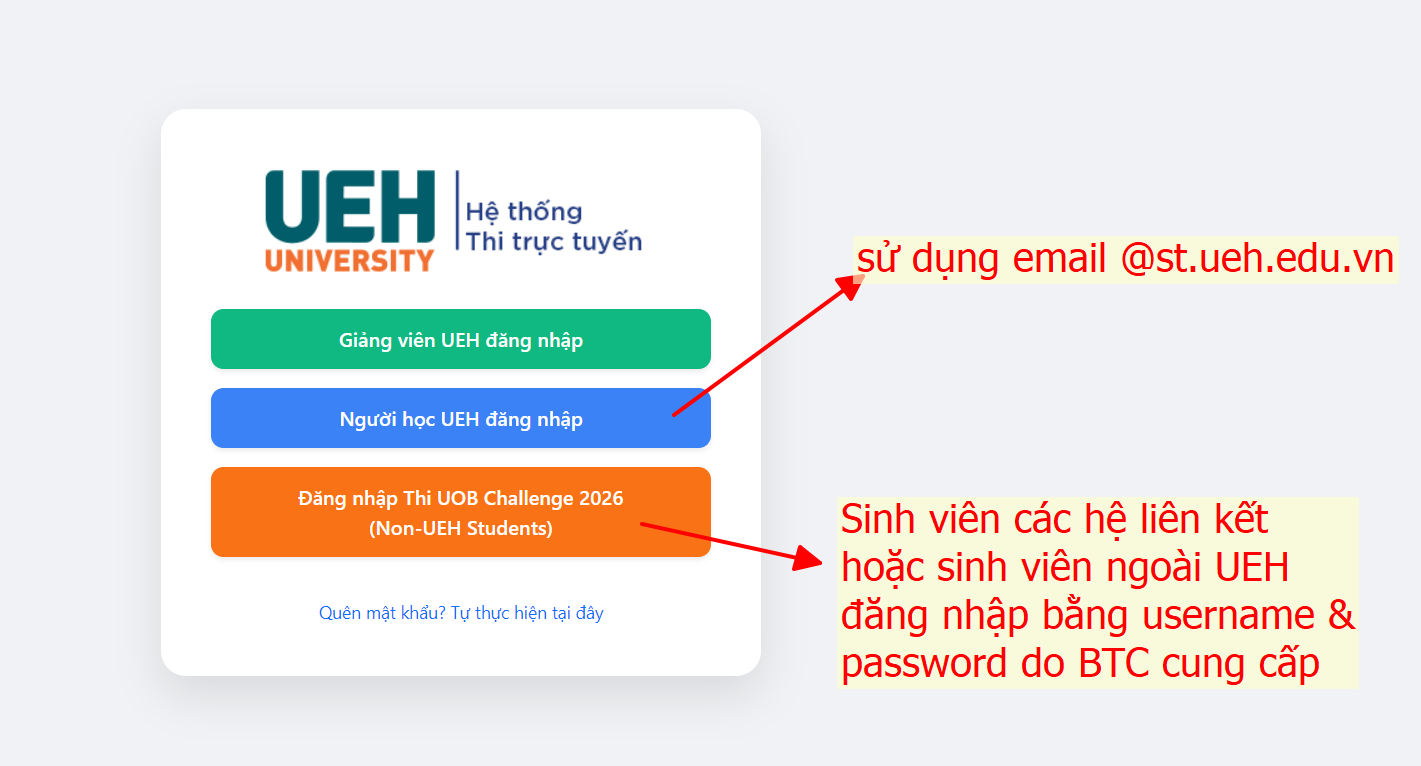
📌 Click image to enlarge. Please select the correct login button corresponding to your candidate type.
UEH Students
👉 Please log in using your UEH student account.
- Use your official student email ending in @st.ueh.edu.vn issued by UEH.
- On UEH LMS login page, click "Người học UEH đăng nhập" (blue button) to authenticate via Microsoft / UEH Office 365.
- Upon login, you will directly enter the UOB Investment Challenge 2026 exam course.
Contestants from Other Universities
👉 Please log in using the Username and Password sent previously to your email.
- On UEH LMS login page, click "Đăng nhập thi tuyển sinh" (orange button).
- Enter the exact Username and Password sent to your email by the Organizing Committee (check Spam/Junk folder if needed).
- If credentials are not received, promptly reach out via hotline or email support below.
4-STEP EXAMINATION PROCESS
Open Browser & Link
Open Chrome or Safari (no SEB needed) and navigate to: lmse.ueh.edu.vn/course/view.php?id=12935
Log in
UEH students click "Người học UEH đăng nhập". Other university contestants click "Đăng nhập thi tuyển sinh" and enter provided username/password.
Start Assessment
Select Round 1 Preliminary exam, read terms and duration carefully, then click "Attempt quiz now" when ready.
Submit & Finish
Review all selected answers and click "Submit all and finish" before the timer expires.
Technical & Browser Notes
- Best compatible browsers: Google Chrome or Safari (latest version).
- Safe Exam Browser (SEB) is NOT needed. The test runs directly in your web browser.
- Recommended to take the exam on a Laptop/PC with stable internet connection.
Contestant Support Desk
If you encounter any login difficulties or technical issues during the exam, please promptly contact the Organizing Committee: